

How to Iron Shirts With Screen Prints
Table of Contents
- Why Ironing Screen-Printed Shirts Requires Care
- What You'll Need Before You Start
- How to Iron a Shirt Without Damaging the Print
- Iron Temperature for Printed Shirts
- How to Remove Wrinkles From a Graphic T-Shirt Without Direct Heat
- How to Wash Screen-Printed Shirts to Protect the Design
- Common Mistakes to Avoid When Ironing Printed Shirts
- Frequently Asked Questions
Last Updated: October 15, 2026
Why Ironing Screen-Printed Shirts Requires Care
Screen-printed shirts make a statement, but the prints need protection when you iron. The ink and adhesive can break down, crack, or fade under direct heat and pressure, so knowing how to iron shirts with screen prints properly keeps your designs looking sharp for years.
The print sits on top of the fabric, not woven into it, so direct contact between a hot iron and the design can cause permanent damage. Learning the right technique takes minutes and prevents costly mistakes.
At Ortrends, we create graphic t-shirts and hoodies built to last, but proper care at home makes all the difference. The steps below show how to iron screen-printed garments safely while preserving the design's color and texture.
What You'll Need Before You Start
Gather these items before you begin ironing:
- A clean iron in good working condition
- An ironing board or heat-safe flat surface
- A protective barrier (pressing cloth, thin towel, or cotton sheet)
- The garment's care label for reference
- Distilled water if your iron uses steam
Having everything ready prevents rushing. The protective barrier is the most important item, it sits between the iron and the print, blocking direct heat contact.
Skipping the barrier to save time causes more print damage than any other mistake. It doesn't need to be fancy, a clean cotton pillowcase works perfectly.
How to Iron a Shirt Without Damaging the Print
Learning how to iron shirts with screen prints follows a straightforward five-step process that protects your design while removing wrinkles.
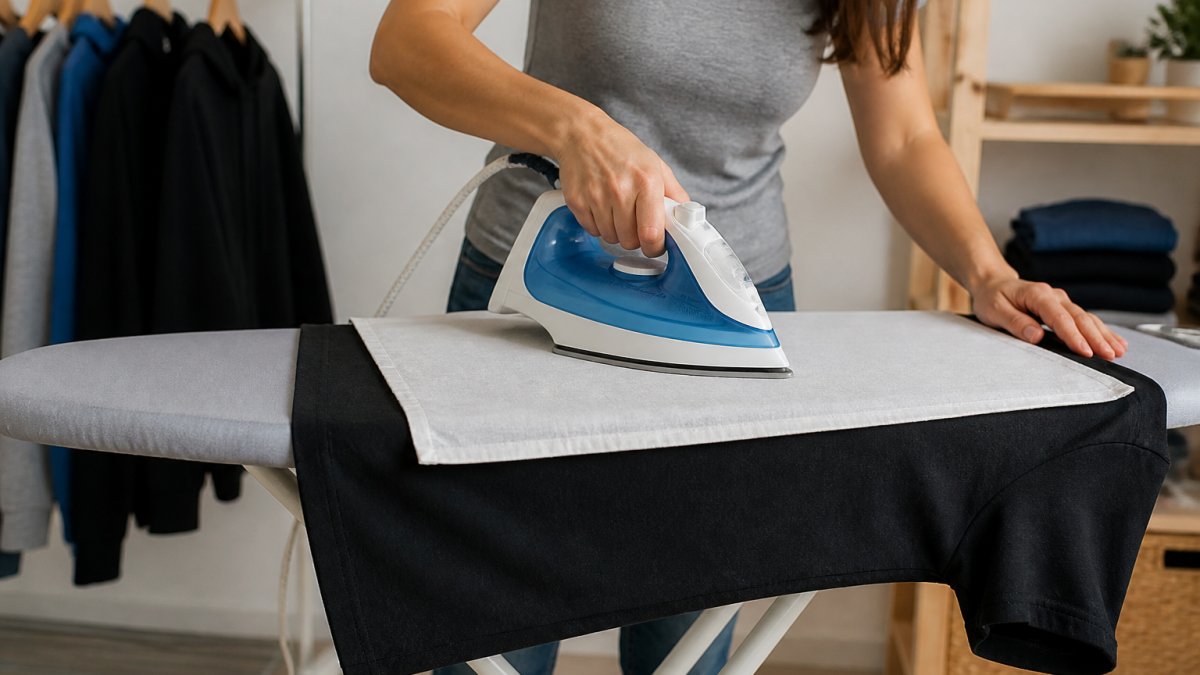
Step 1: Check the Garment Care Label
Always read the manufacturer's instructions before ironing any printed garment. The care label gives the maximum safe temperature and any special handling.
Some prints are more heat-sensitive than others. A "low heat only" or "do not iron" label means the design needs extra caution, higher temperatures will damage that specific print.
If the label is missing or unclear, assume low to medium heat is safest: start cool and increase only if wrinkles remain.
Step 2: Turn the Shirt Inside Out
This is the single most important step for protecting a screen-printed design. Turning the shirt inside out means the iron never touches the print directly.
The fabric side is far more heat-tolerant than the ink and adhesive, so you can use higher temperatures on the back to remove wrinkles while keeping the design safe.
Make sure the shirt is fully turned inside out, with seams aligned and the garment lying flat, a twisted or bunched shirt won't iron smoothly.
Step 3: Set the Iron to the Right Temperature
The right temperature depends on the fabric blend and print type: cotton handles medium heat, while polyester blends need lower settings to prevent melting.
Start low or medium and increase slightly if wrinkles don't release after a few passes. It's always safer to start cool than to start hot and damage the print.
Never use the highest heat setting on a printed garment, high heat can crack, peel, or gloss the ink.
Step 4: Use a Protective Barrier
Even when ironing the inside of the shirt, a protective barrier adds security. Place a thin cloth between the iron and the garment to prevent accidental direct contact if the shirt shifts.
A pressing cloth, clean cotton sheet, or thin towel all work. Cover the entire print area and press gently on the cloth, not hard on the garment.
This step takes seconds but prevents most heat-related damage. It's the difference between a design that lasts five years and one that cracks after a few washes.
Step 5: Iron With Gentle, Continuous Motion
Use smooth, flowing strokes and keep the iron moving. Holding it in one spot concentrates heat and can damage even the back side of the shirt.
Work from the center outward so wrinkles aren't pushed toward the edges. Gentle, continuous motion removes wrinkles without stressing the fabric or print.
Let the iron's weight do the work. If wrinkles aren't releasing with light pressure, the heat is too low, increase the setting slightly rather than pressing harder.
Iron Temperature for Printed Shirts
The right heat setting prevents damage while removing wrinkles. Temperature depends on the fabric and the print type, and the care label and print type always take priority over any general rule of thumb.
Start With the Fabric, Then Adjust for the Print
Fabric sets the ceiling; the print type tells you how far below it to stay.
Cotton graphic t-shirts handle medium heat well. Cotton fibers are stable at higher temperatures than synthetics, so a medium setting (roughly 300-350°F on most home irons) removes wrinkles without stressing the fabric. Cotton is the most forgiving fabric for screen-printed shirts.
Polyester and polyester blends need lower temperatures. Polyester fibers soften and glaze above roughly 300°F, and many polyester shirts are labeled low heat only. Use the low or synthetic setting and stay below 300°F, the synthetic/rayon setting is usually the safest default for a polyester graphic tee.
Cotton-polyester blends sit in the middle. These are common in quality graphic t-shirts and hoodies because the blend resists shrinking and holds shape. Medium heat works for most blends, but check the care label first, a 50/50 blend behaves differently from a 90/10 cotton-heavy blend.
Tri-blends and rayon blends (cotton/poly/rayon) are the most heat-sensitive common fabric in printed apparel. Rayon loses strength when wet and scorches at temperatures fine for cotton, so treat tri-blends like polyester: low heat, short passes, and a barrier every time.
How Print Type Changes the Safe Temperature
Not all prints respond to heat the same way, the ink chemistry and application method determine how much heat a print can take before it changes permanently.
Plastisol screen prints are the most common screen-print ink on cotton tees. A PVC-based ink that cures rather than dries, plastisol sits on top of the fabric as a flexible film. It's fairly heat-tolerant once cured, but sustained heat above roughly 320°F can soften the film, causing it to gloss, pick up texture from the fabric underneath, or transfer to whatever presses against it. Ironing inside out with a barrier keeps plastisol prints safe at medium fabric heat.
Water-based and discharge screen prints soak into the fabric rather than sitting on top of it, feel soft to the touch, and often look slightly faded or vintage by design. They're generally more heat-tolerant than plastisol because there's no plastic film to melt, but the fabric dye around the print can still scorch, use the fabric's safe temperature and keep the iron moving.
Direct-to-garment (DTG) prints are inkjet-printed onto the shirt and cured with a heat press. More delicate than screen prints, they can fade, crack, or develop a shiny patch under sustained iron heat. Treat DTG like a heat-transfer print: low heat, barrier, inside out, and no direct steam on the print side.
Heat-transfer vinyl (HTV) and heat-applied graphics use a heat-activated adhesive, and that same heat can reactivate it, causing the design to lift, bubble, or slide. This is the most heat-sensitive common print type: use the lowest setting that removes wrinkles, keep the iron off the design entirely, and never press directly on an HTV graphic.
Puff, glitter, foil, and specialty screen prints add a raised or metallic layer on top of the ink. Puff ink expands under heat and can flatten permanently if pressed. Foil and glitter prints can crack or dull. Treat all specialty finishes as low-heat only.
A Practical Temperature Workflow
- Read the care label. If it says "do not iron," stop, use a no-contact method instead.
- Identify the fabric. Cotton gets medium; polyester, tri-blend, and rayon get low.
- Identify the print. Screen prints tolerate more heat than DTG, HTV, or specialty finishes.
- Set the iron to the lower of the two limits. If the fabric allows medium but the print is HTV, use low.
- Test on a hidden area first. Press a few seconds, let it cool, and check for gloss, color shift, or lifting.
- Iron inside out with a barrier, and keep the iron moving.
Starting one setting lower than the fabric's maximum and adding a barrier eliminates nearly all heat-related print damage, a minute of care beats replacing a favorite graphic tee.
How to Remove Wrinkles From a Graphic T-Shirt Without Direct Heat
Not every wrinkle requires an iron, and for heat-sensitive prints, DTG, heat-transfer vinyl, puff, foil, and glitter, skipping it entirely is often safest. The methods below remove wrinkles from graphic t-shirts and hoodies while keeping heat and pressure away from the design.
Methods That Keep Heat Away From the Print
Hanging in a steamy bathroom is the lowest-risk option. Hang the shirt in the bathroom while you shower, ambient steam relaxes cotton and cotton-blend fibers without direct heat or pressure on the print. Best for light wrinkles and folded shirts rather than deep creases; expect 10-15 minutes of steam to make a noticeable difference.
Damp towel method removes wrinkles overnight with zero heat. Lay the shirt flat, smooth it with your hands, place a damp (not soaking) clean towel over the wrinkled area, and let it sit several hours or overnight. The moisture penetrates the fabric and relaxes the fibers, the safest method for any print type, but it requires planning ahead.
Wrinkle-release spray is a quick, no-heat option. Spray from 6-8 inches away, tug the fabric gently at the seams, and hang to dry. Results vary by brand and wrinkle severity, and some sprays leave residue that can dull a print over time, so test on a hidden area first.
Hand smoothing and weight works for minor folds. Lay the shirt flat, smooth it with your palms from the center outward, and place a clean, heavy book or folded towel on top for 20-30 minutes. No heat, no moisture, no risk to the print, best for shirts folded in a drawer, not deep creases.
Methods That Use Heat, and What They Do to the Print
These methods can work, but they still expose the print to heat or moisture. Know the risk before you use them.
Garment steamer (handheld or upright) is the best heat-based alternative to an iron for printed shirts. It releases moist heat without contact, so the print never touches a hot plate. Hold it 1-2 inches from the fabric and let the steam work. A handheld steamer is safe for screen prints, DTG, and even HTV as long as you don't press the head against the design. The trade-off: steamers are slower than an iron and less effective on sharp creases.
Dryer on low heat with a damp cloth works for minor wrinkles but isn't risk-free. Add a clean, damp white cloth and run the lowest heat setting for 5-10 minutes; the moisture and gentle tumbling relax wrinkles. The risk: HTV and DTG prints can soften in a warm dryer, and tumbling friction stresses print edges. Use only for screen-printed shirts with a durable plastisol print, and remove the shirt promptly while still slightly damp.
No-contact steam from an iron works for light wrinkles. Hold the iron 1-2 inches above the fabric and use the steam burst. The moisture relaxes fibers without the soleplate touching the print, slower than pressing and only effective on light wrinkles, but a good middle ground when you don't own a steamer.
Hanging near a humidifier or in a warm, humid room is a passive version of the steamy-bathroom method. It takes longer, often an hour or more, but is completely safe for any print type.
What Not to Do
Do not use a hair dryer on high heat. Concentrated hot air can soften plastisol, reactivate HTV adhesive, and fade or crack DTG prints. If you must, keep it on cool or low and hold it at least 12 inches from the fabric.
Do not hang a printed shirt directly on a hot radiator or heater. Radiant heat from a single point can distort the print even without contact.
Do not stretch a damp printed shirt to smooth it. Pulling wet fabric stresses the print-fabric bond and can cause cracking later.
Matching the Method to the Print
- Plastisol screen print: any method above is safe; a garment steamer is the fastest heat-based option.
- Water-based or discharge screen print: any method above is safe; these prints are the most heat-tolerant.
- DTG print: stick to no-heat methods or a garment steamer held off the fabric.
- Heat-transfer vinyl (HTV): no-heat methods only, or a steamer held well away from the design.
- Puff, foil, or glitter specialty prints: no-heat methods only. Heat can flatten puff, crack foil, and dull glitter permanently.
These methods work best for light to moderate wrinkles. Deep creases may still need an iron, but using one of these techniques first reduces the heat exposure required, and for heat-sensitive prints, it may remove the need for an iron entirely.
How to Wash Screen-Printed Shirts to Protect the Design
Proper washing extends the life of screen-printed designs far more than ironing technique alone. The way you clean the shirt affects how long the print stays vibrant and intact.
Wash inside out every time. This keeps the print away from friction with other garments and the machine, the simplest way to protect the design during the wash cycle.
Use cold water. Hot water breaks down the ink adhesive faster than cold, and cold cleans just as well while being gentler on the print.
Choose gentle or delicate cycles. Heavy agitation stresses the print and can cause peeling or cracking. Gentle cycles use less friction while still removing dirt and sweat.
Avoid bleach and harsh detergents. These chemicals fade the ink and damage the adhesive. Use regular detergent in normal amounts and avoid anything labeled "heavy-duty" or "bleach-containing."
Air dry instead of machine drying when possible. Machine heat and tumbling stress the print, hang the shirt or lay it flat. Air drying takes longer but keeps the design fresher longer.
Limit washing frequency. The fewer times you wash a printed shirt, the longer the design lasts. Spot-clean small stains instead of washing the entire garment every time.
These washing practices work with proper ironing to keep graphic t-shirts looking new. Ortrends creates durable prints designed to withstand regular wear, but following these care steps ensures your shirt stays vibrant for years.
Common Mistakes to Avoid When Ironing Printed Shirts
Understanding what not to do prevents most ironing damage. These mistakes are easy to make but cause permanent problems.
Ironing the print directly is the biggest mistake. Even with low heat, direct contact breaks down the ink and adhesive. Always iron the inside of the shirt or use a protective barrier on the print side.
Using steam directly on the print can soften the adhesive and cause the design to wrinkle or bubble. Keep steam on the back side of the garment or use the no-contact method described above.
Pressing hard on the garment transfers too much pressure to the print. Light pressure removes wrinkles just as effectively. Heavy pressure serves no purpose and increases damage risk.
Ignoring the care label leads to heat damage. The manufacturer knows the print's heat tolerance. Following their guidance prevents costly mistakes.
Ironing when the shirt is wet concentrates heat and moisture on the print. Let the shirt dry completely first, damp fabric requires less heat to remove wrinkles anyway.
Using a dirty iron can stain or mark the print. Clean the iron's sole plate regularly. Residue from previous garments can transfer to your printed shirt.
Skipping the protective barrier removes your safety margin. It takes seconds to place but prevents most accidents, the easiest way to guarantee the print stays safe.
Rushing through the process causes careless mistakes. A few extra minutes of careful ironing prevents hours of frustration if the print gets damaged.
Remember one simple rule: the iron should never touch the print directly. Follow that principle and your graphic t-shirt will stay looking great.
Protecting a screen-printed design during ironing comes down to knowing the print is delicate compared to the fabric underneath. Turning the shirt inside out, using the right temperature, and keeping the iron moving prevents nearly all heat-related damage. Combine careful ironing with thoughtful washing, and your favorite graphic t-shirts and hoodies will keep their vibrant designs through countless wears and cleanings, a small effort that pays off every time you put on a shirt that still looks as good as the day it arrived.
Frequently Asked Questions
Can you iron a shirt with a screen print?
Yes, you can iron screen-printed shirts safely when you follow the right steps. The key is to turn the shirt inside out, use low to medium heat, apply a protective barrier like a pressing cloth, and keep the iron moving. Direct heat and high temperatures can crack, peel, or fade the print, so manufacturer instructions on the garment care label should always guide your approach.
What temperature should you use to iron a screen-printed shirt?
Use low to medium heat, typically between 250-300°F, depending on the fabric. Cotton blends and polyester require different settings; check your garment care label for the exact recommendation. Never use high heat on screen-printed designs, as the ink can become damaged. When in doubt, start with a lower temperature and test on a hidden area first.
Should you turn a screen-printed shirt inside out before ironing?
Yes, turning the shirt inside out is one of the most important steps. This keeps the iron and any direct heat away from the printed design, protecting the ink from cracking or peeling. Iron the back of the shirt instead, and the wrinkles on the front will smooth out without risking damage to your graphic print.
How do you remove wrinkles from a graphic T-shirt without ironing the print?
Beyond traditional ironing inside-out, try steam from a garment steamer held 6 inches away from the fabric, or hang the shirt in a steamy bathroom to let moisture relax the wrinkles naturally. You can also use a damp cloth and low heat, or simply air-dry the shirt on a hanger after a gentle wash. These methods avoid direct contact with the print entirely.